Subtitling 62 hours of travel footage, and working efficiently with AI
Also in: Bahasa Indonesia · हिन्दी · العربية · ไทย
For 62 hours of travel footage, I changed the subtitle workflow: Premiere's transcription finds where people speak, and only the highlights get polished with Gemini. With AI, the cost turned out to depend on conversation length and the number of back-and-forths.
This is the last of the work notes. It covers subtitles, cost, and the old footage I tidied up along the way.
Subtitles: Premiere transcription + Gemini
Gemini's SRT output was the most accurate for subtitles. But I couldn't feed all 62 hours into Gemini, so I changed the approach.
| Step | Detail |
|---|---|
| 1 | Export each per-day sequence as MP3 with Media Encoder |
| 2 | Run Premiere's transcription first to locate the speech. The default language was set to English, so I switched it to Korean |
| 3 | Drop the unrecognized segments from the transcription output (JSON), which filters out safari radio noise |
| 4 | Build an SRT from the JSON and add it to the v2 sequences as a caption track through the MCP |
| 5 | Polish with Gemini only the parts that will actually be used in the edit, not everything. Highlight sections dense with conversation were picked by score and cut into 2-minute chunks. The Gemini app only transcribed about 2 minutes reliably to the end, so I came down from the 3-minute chunks I started with |
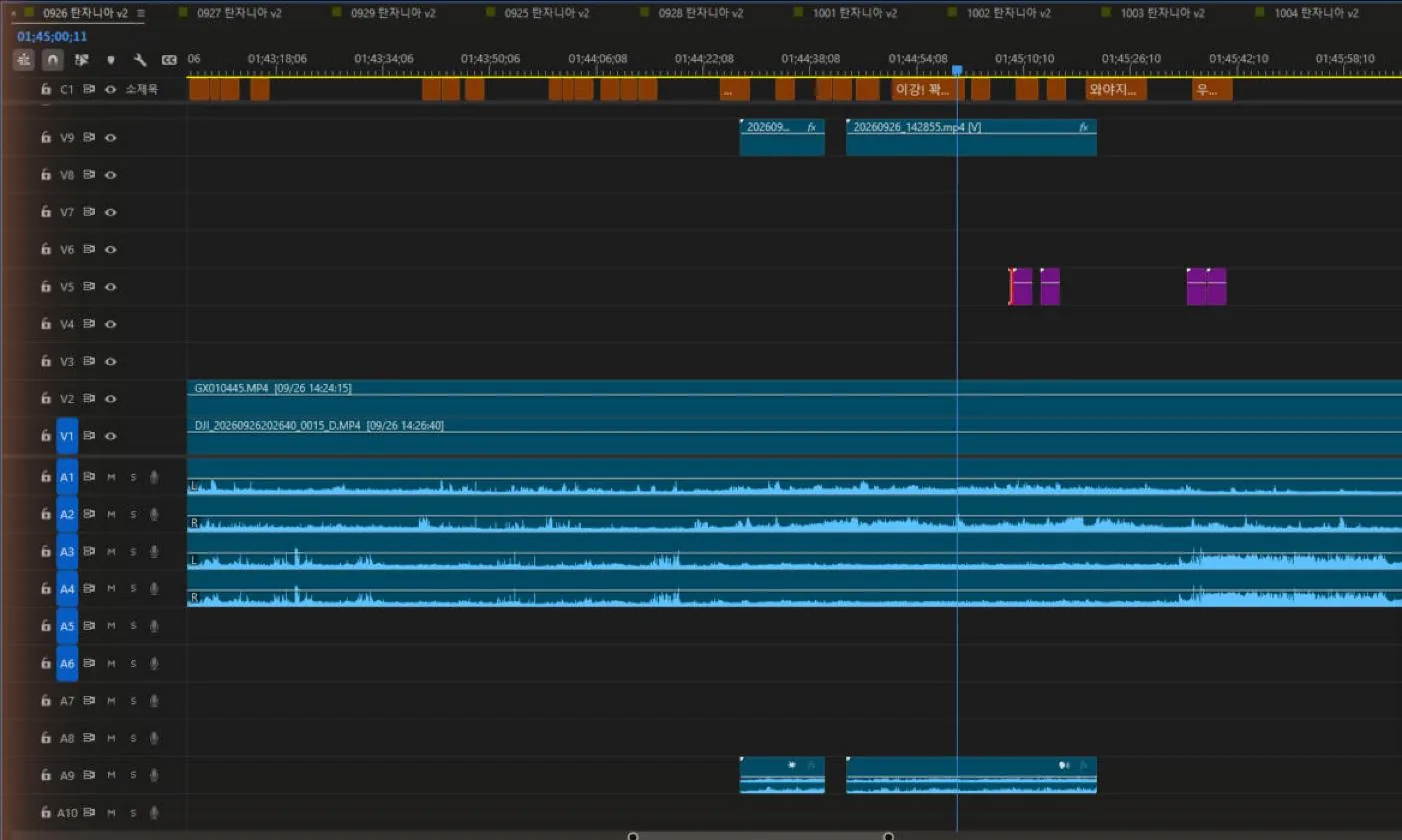 C1 at the top of the v2 sequence is the caption track. Because these are captions rather than text clips, they're easy to re-export as SRT or edit later.
I queued the transcriptions day by day in Premiere and let them run on their own. At first the AI checked every 3 minutes and handled them one at a time, but a mid-way review showed that was inefficient, so it switched to processing finished days in batches every 30–40 minutes.
I also tried having it send a phone notification when a job finished. On the AI's side it said it had sent several, but not one arrived. I decided to just check in more often myself.
Cost and efficiency
This was the first time I really paid attention to usage. Every time it sends a command, the AI rereads the entire conversation up to that point. So the longer the conversation, the more the same task costs, several times over. Waiting 20 minutes costs almost nothing. Lots of back-and-forth is what's expensive.
Partway through, I asked whether the way we'd been working was efficient. The answer was: about half and half.
| Task | Assessment |
|---|---|
| Recovering GoPro times | Fixed dozens of files at once with two or three scripts, and passed verification on the first try |
| Sorting out where the project is saved | Done in a few steps |
| Checking the Canon times | Inefficient. Tried to pull audio from the whole external drive and gave up because of the speed, received a 260,000-character error log in full, and trusted an untested assumption through two rounds of audio comparison. One photo would have answered it immediately |
So at the end, it wrote a handover document into the working folder, and we agreed to move to a new conversation timed to when the usage limit resets. It even wrote the first message to paste into the new conversation.
Read the handover notes in the Tanzania edit folder on the home PC (drive I:) and let's continue the Tanzania edit.
Ask for every permission you need all at once at the start, and run the work in parallel.
The handover document also includes the tips I picked up this time.
| Tip | Detail |
|---|---|
| Reading external drives | Slow. Read only the parts you need, not whole files |
| Output | Get summaries only. A flood of logs is all cost |
| Verification | Before running something long, test the hypothesis on one sample |
| Bulk copying | 7-Zip File Manager is faster than copying from the command line |
| Audio sync | Line up two clips by comparing how their loudness changes |
Old footage, same structure
It wasn't only the trip footage. I also brought 14 folders of personal footage shot before the trip into the same structure.
| Item | Detail |
|---|---|
| Structure | Originals\Video, Originals\Photos, Other, Project |
| Rules | Video and audio go in Originals\Video, photos in Originals\Photos, processed material like edits and graphics in Other, project files in Project |
| Verification | Checked the file count matched what was there before |
| Left alone | Folders that already had a structure, projects being edited (in case links break), folders without dates |
| Next | Create a project for each folder, with sequences split into per-camera tracks |
Remaining work
| To do | Note |
|---|---|
| DAY 4 and 6 | Brought the laptop material over on an external drive. Connect it and add it |
| DAY 9 | Empty folder on every storage device |
| 343 RAW photos | Export to JPG from Lightroom and add |
| Subtitles | Transcribe the remaining days, transcribe only the new clips separately, polish the highlights with Gemini |
| Sequences for old footage | Per project, after transcription is done |
| Cloud copies | Two OneDrive 1TB accounts, Google Drive 400GB |
That's the end of the work notes. From the next post, I plan to sort out my thoughts on what this stockpile of footage could become.