Syncing capture times across five cameras and building per-day sequences in Premiere
Also in: Bahasa Indonesia · हिन्दी · العربية · ไทย
I lined up 905 clips from cameras with mismatched clocks to their real capture times using GPS and photos, then automatically built per-day Premiere sequences with a separate track for each camera.
In part 1 I gathered the footage onto one drive. This step lays it out so it can actually be edited. There were five kinds of camera: Osmo Nano, GoPro, Canon 100D, Canon G7X (my wife's camera), and a phone.
Syncing capture times: every camera's clock was different
To edit, you need clips from several cameras placed in the order they were actually shot. But each camera's clock used a different reference. Local time in Tanzania is UTC+3, six hours behind Korea.
The AI pulled the capture time from all 905 files and worked through them camera by camera.
| Camera | Clock state | How it was fixed |
|---|---|---|
| Osmo (412 clips) | File names carry Korea time | Subtract 9 hours from the time in the file name to get UTC, then add 3 hours for local time |
| GoPro (215 clips) | A mess | See below |
| Canon 100D and G7X (276 clips) | Not local time | First wrongly assumed to be UTC, confirmed as Korea time in a later session |
| Other (2 clips) | Filed separately | Their own track |
GoPro
The GoPro asks you to set the time every time you turn it on, and I often punched in something rough just to get past it. Some were probably set to the wrong year entirely, like 2016. So the timestamps on those files couldn't be trusted.
The clue the AI found was the GPS data the GoPro records inside the video. GPS carries accurate time from the satellites. Files with a GPS fix used that time directly. For files without one, it relied on the fact that a wrong clock is wrong by a constant amount. It found ranges of file numbers shot with the same clock setting, worked out the offset for each range, and shifted them back in one go.
| File number range | Clock offset |
|---|---|
| 0418–0433 | Almost correct |
| 0434–0460 | About one day |
| 0461–0479 | About 3 hours 20 minutes, in the other direction |
| 0482–0636 | About 153 days |
| 0637–0640 | About 163 days |
That recovered 214 of the 215 clips. The last one (GX010479) got "estimated time" added to its name. Where the GoPro and Osmo were rolling at the same time, comparing the audio waveforms confirmed the sync to within 10–20 seconds.
Canon
For the Canons, I first took them to be on Korea time, then assumed local time and ran two rounds of audio comparison. Both were wasted effort. In the end, a single photo solved it. At the same moment the Osmo showed daytime, the Canon showed us eating dinner. That made it certain it wasn't local time. UTC seemed likely, so I entered +3 hours for now. That got overturned in the next session. Photos stamped 8–10 p.m. by the camera clock were all midday safari scenes (zebras, lions, elephants), and shifting them back 9 hours gave the most overlap with the GoPro GPS and the Osmo. Both the 100D and the G7X were on Korea time. The G7X videos (MP4), though, were recorded correctly and needed no correction.
Per-day sequences in Premiere
Once the times were sorted, the rest was just placing clips by rule. The AI wrote a script that generated sequence files (XML) for Premiere, and I imported them. We tested with DAY 1 alone first, confirmed the approach, and then built everything in one go.
| Item | Rule |
|---|---|
| Sequences | 16, one per day, 4K 29.97fps |
| Day boundary | 4 a.m. Anything shot after midnight goes to the previous day |
| Tracks | V1 Osmo, V2 GoPro, V3 Canon, V4 other. Two audio tracks per camera |
| Simultaneous shots | Stacked at the same point, one above the other |
| Between scenes | Gaps compressed to 2 seconds |
| Markers | Local time at each scene |
| Clip names | [date time] appended |
| Scale | 2.7K clips scaled up to fit 4K |
| Left out | Temporary sync files, thumbnail and proxy files, anything under 0.5 seconds, exact duplicates |
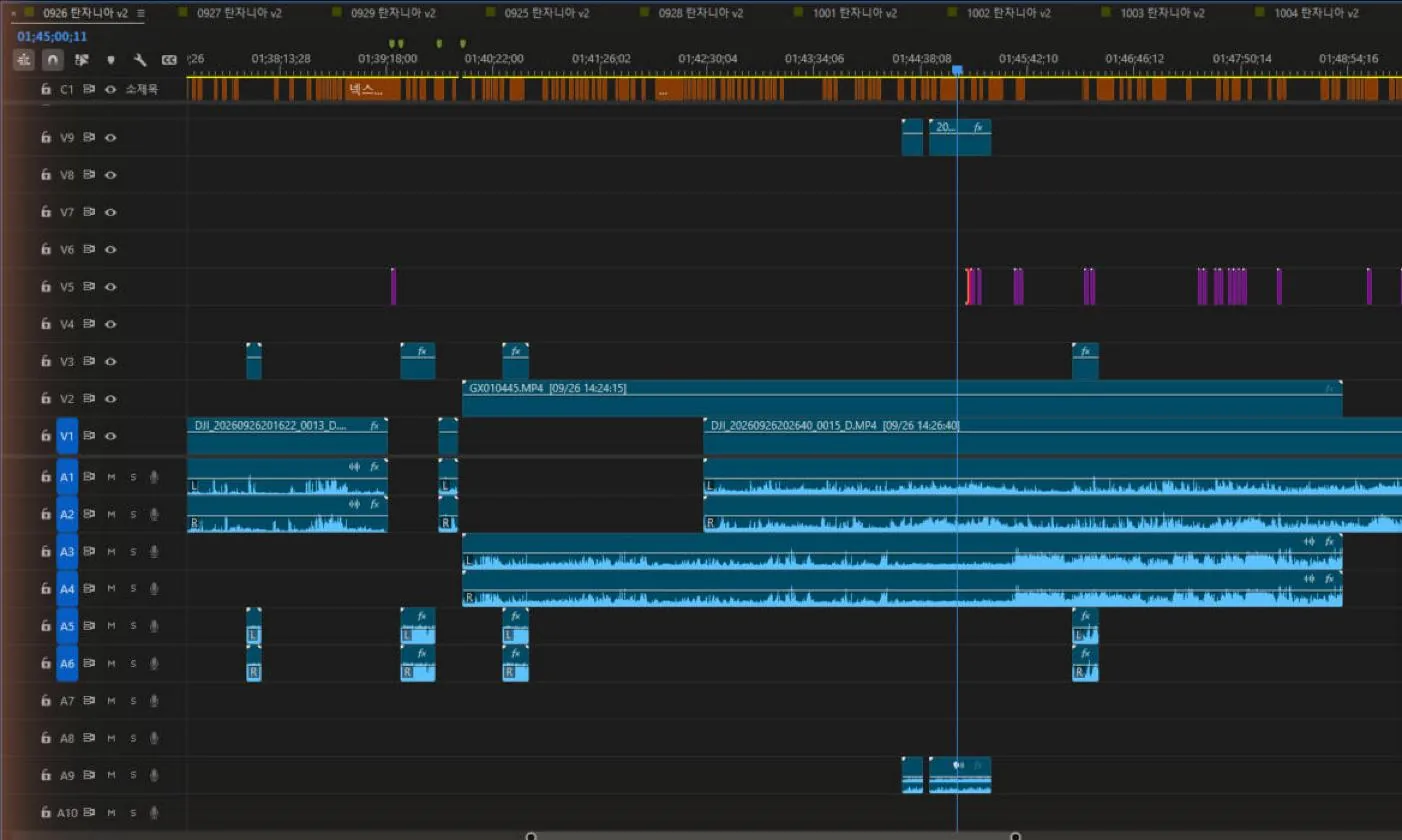 The 9/26 sequence at around 1 hour 40 minutes. V1 Osmo, V2 GoPro, V3 Canon, V5 photos, V9 phone. Cameras that caught the same moment are stacked on top of each other.
Here it is by day.
| Date | Clips | Cameras | Length |
|---|---|---|---|
| 9/24 | 4 | Osmo | 2 min |
| 9/25 | 54 | Osmo 41, GoPro 13 | 158 min |
| 9/26 | 130 | Canon 68, Osmo 36, GoPro 26 | 232 min |
| 9/27 | 182 | Canon 96, Osmo 66, GoPro 20 | 380 min |
| 9/28 | 42 | Canon 33, GoPro 6, Osmo 2, other 1 | 91 min |
| 9/29 | 154 | Canon 75, Osmo 44, GoPro 35 | 454 min |
| 9/30 | 2 | GoPro | 2 min |
| 10/1 | 37 | Osmo 21, GoPro 16 | 387 min |
| 10/2 | 51 | Osmo 36, GoPro 15 | 367 min |
| 10/3 | 62 | Osmo 47, GoPro 15 | 281 min |
| 10/4 | 41 | Osmo 31, GoPro 10 | 310 min |
| 10/5 | 30 | GoPro 23, Osmo 7 | 322 min |
| 10/6 | 38 | GoPro 27, Osmo 11 | 129 min |
| 10/7 | 20 | Osmo | 244 min |
| 10/8 | 13 | Osmo 9, GoPro 4 | 198 min |
| 10/9 | 15 | Osmo 13, GoPro 2 | 119 min |
9/29 alone runs over 450 minutes. Opening every clip, laying them out by camera and lining up the times is normally the part of editing I hate most, and it was gone entirely. Once the import finished, Premiere started its own media analysis.
I kept the working files. When more footage turns up, I just run these again.
| File | Purpose |
|---|---|
| clip_times_fixed.csv | Corrected capture times for all 905 clips |
| make_all.py | Script that builds the per-day sequences. Rerun it when the Canon times change |
| Handover notes (Markdown) | Locations, per-camera offsets, remaining work, working tips |
v2 sequences, rebuilt in the next session
After the Canon times were confirmed, I rebuilt the sequences in a new session.
| Task | Result |
|---|---|
| Canon times | 100D and G7X confirmed as Korea time and corrected |
| Photo track | 778 photos (100D 678, G7X 73, GoPro 15, Osmo 12) placed on a photo track as 3-second shots. 343 that exist only as RAW (CR2) can't be read by Premiere, so they were left out for now and listed in a file |
| v2 sequences | Rebuilt with photos as 17 per-day sequences. Five photos taken in Korea on the morning we flew out created an extra 0923 sequence |
| New footage | 407 clips that had never been backed up, from the G7X, 100D and phone, placed on new tracks, so the existing track layout and the MP3s already exported stayed untouched |
| Finding missing files | Tracked through gaps in the camera file numbers. The 240 files numbered 4293–4532 on the 100D match exactly one day, DAY 4, so they're probably in the laptop material |
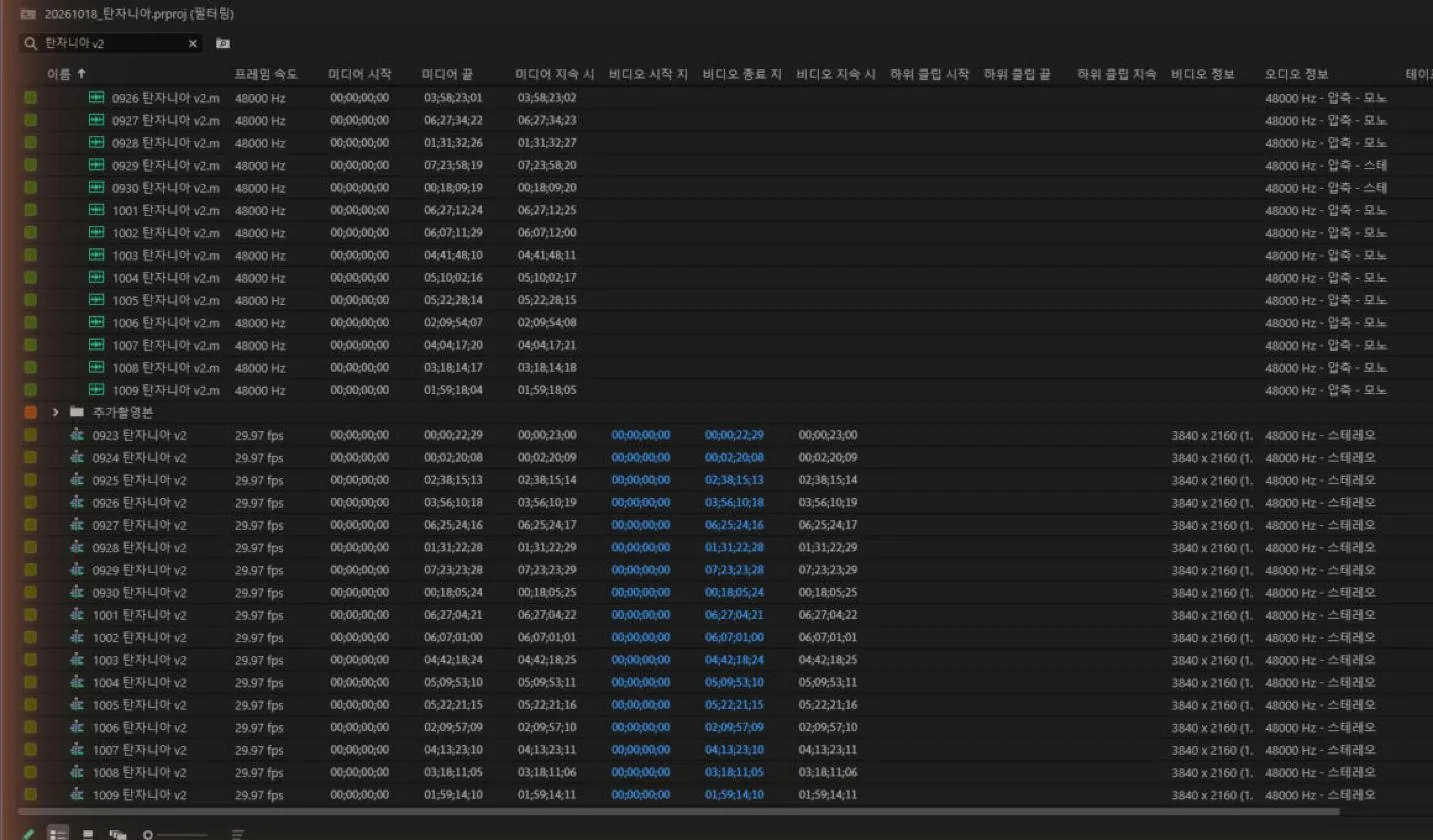 The project panel. The per-day MP3 exports at the top, the 17 v2 sequences in 4K 29.97fps below.
In the next post I write up the connection that let AI drive Premiere directly: the Premiere MCP.